Post Auto-replies
ReadyChatAI can answer comments on published Facebook and Instagram posts, either publicly or by private message.
Path: Communication > Post Management > Configure
First-time setup
The guided setup covers Welcome, Reply Mode, Targeting, Limits, Accounts and Confirm. Its choices become the defaults for new posts. Quick Setup uses the recommended choices and jumps to confirmation.
Configure one post
Open Configure on the post and review:
- Reply mode — public comment or direct message. Both Facebook and Instagram support the private-message mode. Turning on Direct Message does not replace the public reply: every qualifying comment still gets a public reply under the post, and the DM goes out in addition. There's no way to reply by DM only.
- Post Context — facts specific to this post, offer or campaign.
- Include Business Context — also use the configured products, services, hours and policies.
- Comment Targeting — consider all comments or only those containing a keyword. Keywords are 2–50 characters, unique and case-insensitive.
- Filter comments with AI — skip spam, abuse or irrelevant comments after targeting has decided which comments to consider.
Test before enabling
Enter a sample in Test Comment and press Generate. The preview uses the settings currently on screen, including unsaved changes.
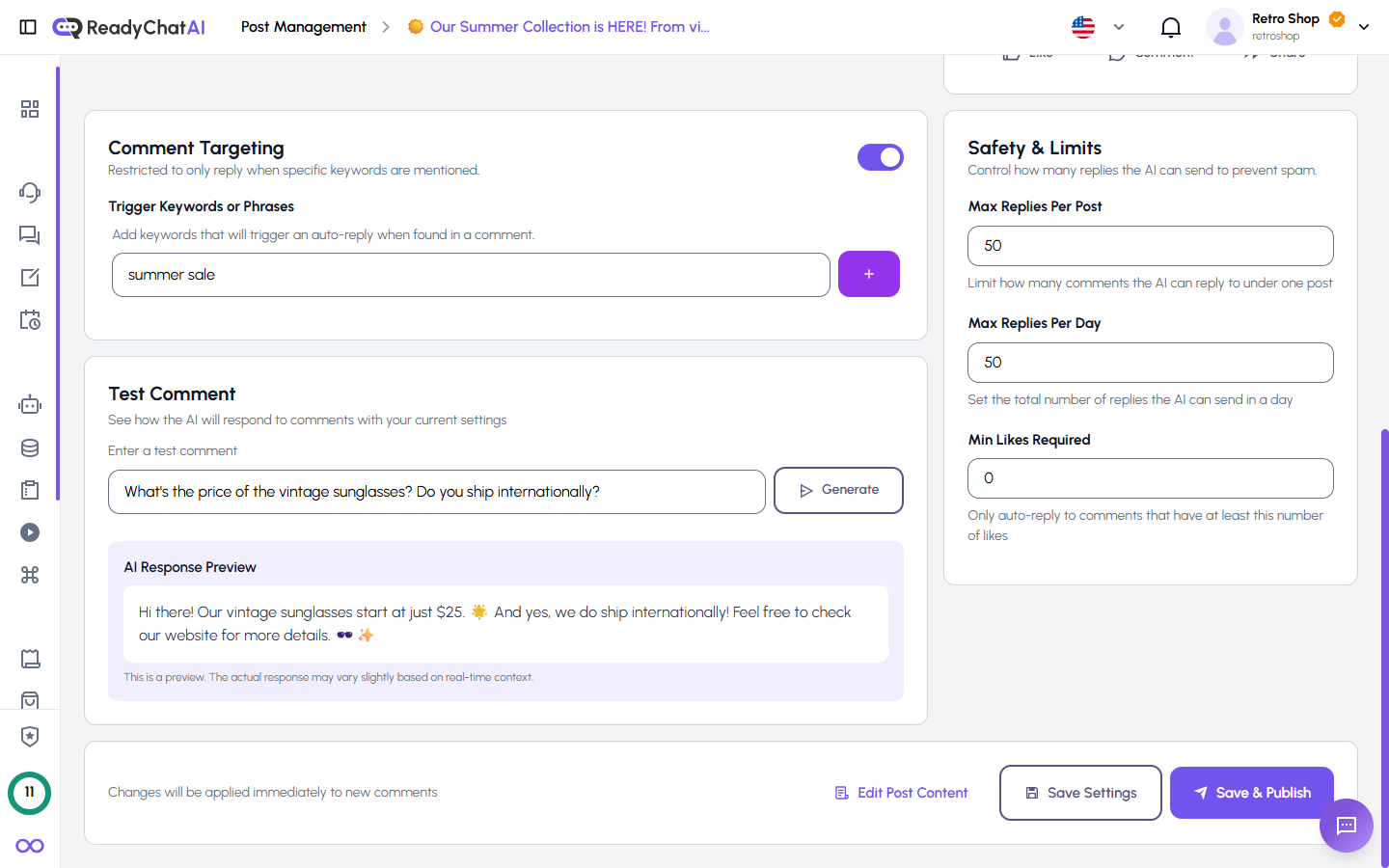 Preview the answer before enabling it.
Reply limits
| Setting | What 0 means |
|---|---|
| Max Replies Per Post | No comments are answered; the default for a new post is 50 |
| Max Replies Per Day | No daily limit |
| Min Likes Required | Every comment can qualify |
The two maximum fields therefore behave differently at 0. To allow replies without a daily cap, keep the daily limit at 0 and give the per-post limit a positive value.
ReadyChatAI also enforces two limits you can't turn on or off: it never sends a second reply to the same commenter on the same post within 24 hours, and it caps a single post to about 5 replies per hour, even if Max Replies Per Post still has room. Both protections run only while Filter comments with AI is on (or while Comment Targeting is active) — replying to all comments with filtering off skips them too, so a sudden burst of comments on that post can be answered with no per-user or per-hour throttling at all.
Save and inspect results
Save stores the settings. A draft also offers Save & Publish.
The post's Comments section records the outcome:
- Replied shows the source comment, generated reply, public/private mode, delivery result and links back to the network or conversation.
- Filtered shows comments intentionally skipped and the reason, such as spam, off-topic content, missing keyword, contact details, insufficient likes, already replied, or a reached limit.
Account defaults
Default Settings defines how new posts begin for each connected account: reply mode, business context, AI instructions, limits, keyword targeting and AI filtering. A post can override its account defaults.
When replies do not go out
Check in this order:
- The post is published; drafts do not receive auto-replies.
- Auto-reply is enabled and a reply mode is selected.
- Required keywords are present when targeting is enabled.
- Max Replies Per Post is positive and has not been reached.
- The comment has enough likes.
- The account is active and connected in Channels.
Then open Filtered. If the comment appears there, its reason is more useful than retrying blindly.
Return to Post Management for creating and publishing posts.