Categories
Categories group your products. They keep the catalog tidy for you, they give the bot a vocabulary for talking about ranges of products ("what desserts do you have?"), and they're what the sales metrics are broken down by.
Where it is: sidebar → Commerce & Services → Products → Categories tab. In a real-estate account the same tab is Real Estate → Properties → Transaction Types — a transaction type IS a category, under another name; see Real Estate Mode.
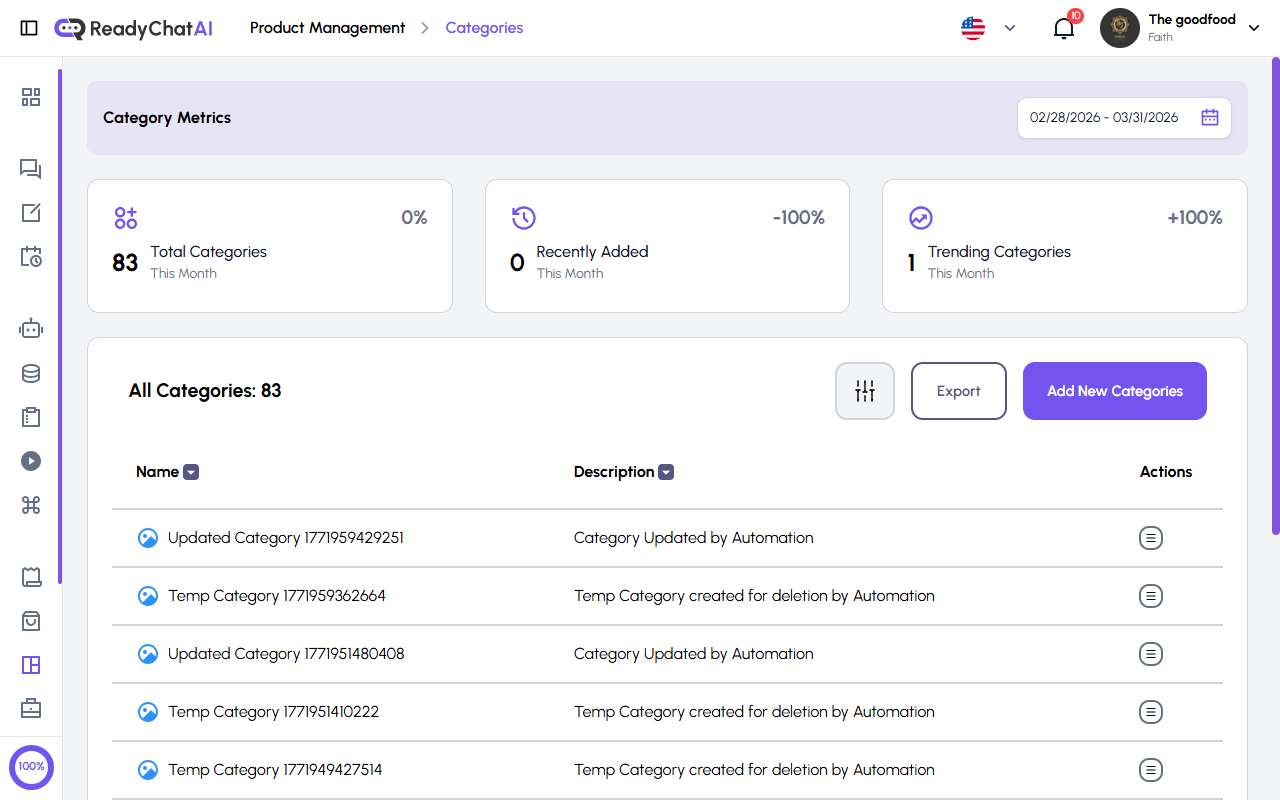 Category Metrics and the categories table.
Real estate businesses
If your business is set up for real estate, this feature is relabeled throughout the dashboard: Categories appears as Transaction Types, and Products appears as Properties. It's the same feature with the same rules — the 32-character name limit, the duplicate-name check, image size — only the wording changes.
Category Metrics
Three cards, filtered by the date range at the top right:
- Total Categories — how many categories existed by the end of the period.
- Recently Added — categories created inside the period.
- Trending Categories — how many categories had sales during the period. It counts products ordered, not products viewed, so a category nobody bought from doesn't appear — and it counts every order placed in the period regardless of status, so a still-pending or even a cancelled order counts toward the total.
Each card shows the percentage change against the previous period.
The categories table
| Column | What it shows |
|---|---|
| Name | The category name, with its image |
| Description | The description you wrote |
| Actions | View the category, or delete it |
Name and Description are sortable — click the column header. The header also has a filter button, Export (downloads your categories) and Add New Categories.
To edit a category, open it from View Category and use the Edit button on its detail page — or just click anywhere on its row in the table to jump straight to the same edit form.
Creating or editing a category
Click Add New Categories and fill in:
| Field | Rules |
|---|---|
| Category Name | Required. Up to 32 characters. It cannot repeat inside your business, regardless of capitalization — if you try, you get a "this category already exists" message |
| Description | Optional. Up to 200 characters |
| Category Image | Optional. Recommended size 280 × 280 px. Up to 8 MB, in JPG, PNG, GIF or WebP |
Save, and the category is available immediately in the product form.
You can also create a category without leaving the product form: in the Category field, choose "new category" and its name and description appear right there.
Deleting a category
Deleting a category does not delete its products. They stay in the catalog and simply end up with no category, so you can reassign them — one by one, or with the Category bulk action on the products list.
Getting more out of it
- Name them the way your customers speak. "Desserts" works better than "Line 3": the category name is text the bot reads and can repeat back.
- A short, real description is worth more than an empty one. It is one more thing the bot can use to decide whether a product fits what's being asked.
- Every product with a category. A product with none is harder for the bot to place, and it disappears from the category metrics.
- Review from time to time. Merge categories that mean the same thing and remove ones you stopped using — deleting one won't cost you products.