Playground
Talk to your own bot before your customers do
Path: AI Configuration > Playground
The Playground is a chat with your real bot, using your real knowledge base and your real settings — with no customer on the other end. It is the fastest way to find out what your bot actually says, as opposed to what you assume it says.
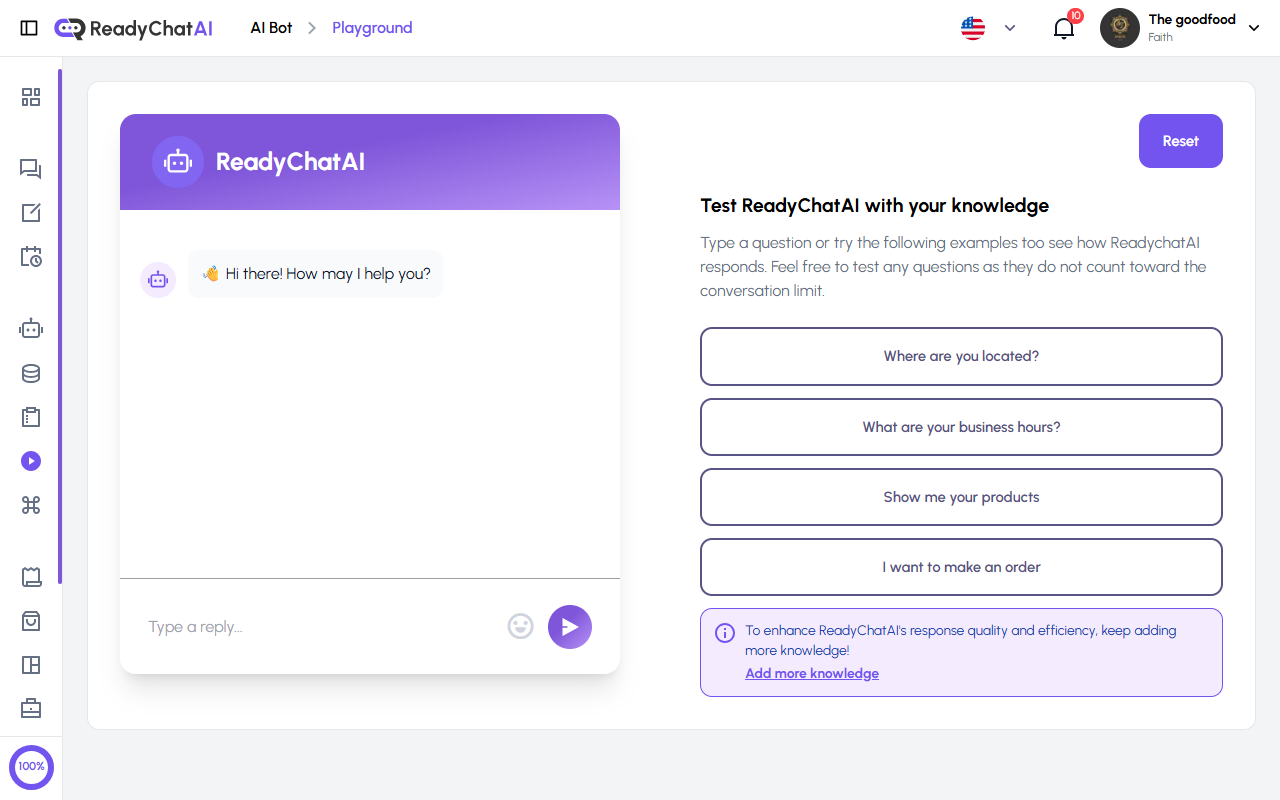 The chat on the left, the testing panel on the right.
It doesn't cost you messages
Messages you send here do not count toward your plan's conversation limit. Test as much as you want, ask the same thing eight different ways, and it changes nothing on your bill. This holds even if you have already used up your plan's messages for the month — the Playground keeps working.
That's different from a locked account. If your subscription is on hold — a trial that ended with no payment method, or a failed charge — the Playground stops responding just like the rest of the dashboard, and asks you to add a payment method. Running out of messages never blocks you; an unpaid account does.
The chat
The left side is an ordinary chat window. The bot opens with "Hi there! How may I help you?"; type in the Type a reply... box and send.
You can also record a voice note with the microphone button, which is the only honest way to test what happens when customers send audio instead of typing — and many do.
While the bot is working you may see what stage it is at: Thinking…, Searching information… or Running tools… (the last one means it is looking something up, for example your product list or an available appointment slot).
Orders and appointments are simulations
The Playground reads your real products, services, availability, knowledge and bot settings, but actions stay inside the test. It can collect checkout answers, show an order confirmation or walk through booking, rescheduling and cancellation. It does not create a real order or appointment, contact a customer, charge a payment method or send a notification.
One setting is the exception: Redirect users to the booking page? in Configure is always treated as Off here, so a booking test finishes inside the chat even when you have that setting turned On for real customers — the booking-link button never appears in the Playground.
Confirming an appointment here always reports success, even for a time slot you deliberately pick because you know it's already taken. The search for open times still reflects your real calendar, but the final confirmation skips the double-check, because nothing is actually written to your calendar in a test.
Use the result to check the conversation, then repeat the action through a real customer channel when you need a real record.
The testing panel
On the right, under "Test ReadyChatAI with your knowledge":
- Four example questions you can click to fill the message box: Where are you located?, What are your business hours?, Show me your products, I want to make an order. Clicking one only types it in — press Send (or Enter) to actually ask it. They are a quick check that the basics are wired up.
- Reset, top right, clears the conversation and starts fresh. Use it between tests — otherwise the bot still remembers what you said a moment ago, and you will not be testing what you think you are.
- A reminder at the bottom to Add more knowledge, linking straight to the Knowledge Base.
Limits and errors
A single test message tops out at 5,000 characters, and the same account can send at most 100 test messages within any rolling hour. Ordinary testing never comes close to either.
If the bot doesn't answer within about a minute — a normal reply lands in 2 to 5 seconds — or you hit the limits above, the Playground shows the same generic message: "Something went wrong while sending the message. Please try again later." It doesn't say which one happened. Seeing it once is worth a retry in a few minutes before you assume your bot is broken.
How to test properly
Ask it the way a customer would. Customers type "u open sundays?", not "What are your business hours?". The examples are a starting point, not a test suite.
Ask the same thing three ways. "When do you close?", "are you open now?", "what time do you shut" should all land. If one of them doesn't, that's a gap worth an entry in the Knowledge Base.
Reset between scenarios. A fresh conversation is a fresh customer.
Try the awkward ones. Ask about a price you never entered, a service you don't offer, something outside your business entirely. What you want to see is the bot saying it doesn't have that information — not inventing something. If it invents, the fix is to add the fact, not to instruct it not to invent.
Check the tone, not just the facts. Read a few replies out loud. If it doesn't sound like your business, adjust the tone field in Configure and come back.
Playground conversations appear in Messages. The first time you use the Playground, ReadyChatAI creates a test channel for it, and from then on a Playground tab appears in Messages where you can read back everything you asked. They are your own tests, not customers — but they are stored like any other conversation.
The loop that actually works
Ask in the Playground → find what it can't answer → answer it in the Knowledge Base → ask again. Twenty minutes of this before you connect a channel is worth more than a month of adjusting settings.